Vozohealth

Billing Without Backlogs.

Clinic Billing Automation Software for Faster Payments

Manual posting and delayed claims slow billing teams. Routine billing runs automatically so revenue keeps moving.

Trusted by Clinic Billing Teams Nationwide.

Why Clinics Choose VOZO for Billing Automation

VOZO reduces billing friction by keeping charges, claims, and payments moving together without constant staff intervention.

End-to-End Billing Flow

Charges, claims, and payments stay connected from visit completion through reimbursement without manual handoffs or tracking gaps.

Built for Clinic Teams

Supports real clinic billing volume without complex systems, oversized tools, or hospital-level billing processes.

Less Staff Rework

Reduce corrections, follow-ups, and end-of-day billing cleanup that slows teams and delays revenue collection.

Features

Tools That Keep Billing Moving

Clinic billing automation software designed to reduce delays, prevent errors, and keep revenue flowing consistently.

Charge Capture Automation

Completed visits automatically generate accurate charges, reducing missed services and eliminating manual charge entry steps.
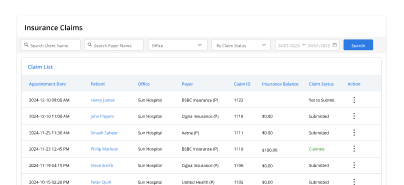
Claim Creation & Submission

Create and submit clean claims faster, reducing edits, resubmissions, and delays caused by incomplete documentation.

Payment Posting

Post payments efficiently with clear links to visits, charges, and balances for faster reconciliation.
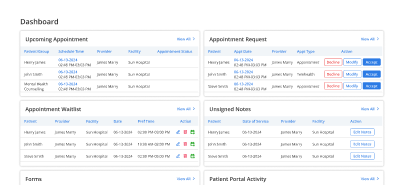
Billing Dashboard

Track claim status, payments, and open items daily from one clear, billing-focused dashboard.

Denial Tracking

Identify billing issues early and resolve denials before they interrupt revenue flow or staff productivity.
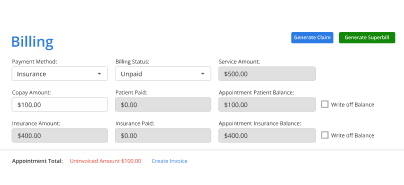

Patient Billing Tools

Share statements and balances clearly to reduce patient questions and front-desk billing calls.

The Impact of Clinic Billing Automation on Revenue and Efficiency

Clinics using billing automation software experience faster claim processing, fewer billing errors, and quicker payments.

Hours Saved
0 +
Faster Claims
0 %
Fewer Follow-Ups
0 %
Uptime
0 %

Support Across Billing Roles

How it works

Step Onboarding

Switch to Vozo EHR and get a smooth, all-in-one experience built for behavioral health.

Switch to Vozo EHR and get a smooth, all-in-one experience built for behavioral health.

1
Create Your Account

Start immediately with a free trial or guided demo.

2
Set Up Billing Workflows

We configure integrated billing automation and migrate billing data securely.

3
Start Getting Paid Faster

Begin using scalable billing automation for clinics without disrupting daily operations.

Testimonials

Success Stories From Our Users

What Clinics Say About VOZO Billing

“Billing used to slow down our clinic after every visit. Vozo helped us organize charges, payments, and follow-ups in one workflow, so our team spends less time correcting missed billing steps.”

— Dr. Jessica Moore, Family Medicine Physician

“Our billing team needed fewer manual checks and cleaner coordination with the front desk. Vozo made it easier to track payments, reduce billing gaps, and keep daily clinic revenue work moving.”

— Brian Mitchell, Revenue Cycle Manager

Blogs & Resources

Resources to Help Your Practice Grow

Automate Billing Workflows

Vozo EHR automates end-to-end billing to reduce denials and speed up reimbursements.

Medical Billing Automation

Shift from manual to automated billing processes for faster revenue cycles and fewer errors.

EHR Features for Billing

Essential 2026 EHR features automate billing processes while enhancing small practice compliance and speed.

FAQ

What Clinics Ask Us Most

What is billing automation in healthcare clinics?

Billing automation streamlines clinic operations by automating tasks such as coding, claim generation, and payment tracking. It reduces manual work, ensures accurate claims submission, and improves cash flow by speeding up reimbursement cycles. Automation also minimizes human error and helps clinics improve operational efficiency.

How can billing automation help clinics reduce administrative costs?

By automating repetitive tasks like claim submissions and coding, billing automation reduces the need for manual labor. Clinics can allocate resources more effectively and reduce overhead costs associated with administrative tasks.

This leads to lower operational expenses and improved productivity, allowing staff to focus on patient care rather than administrative duties.

Why should small clinics consider billing automation software?

Billing automation software reduces manual errors, speeds up billing processes, and improves reimbursement rates. For small clinics, it offers a cost-effective solution that minimizes administrative burden, ensuring that staff can focus on patient care.

Automation streamlines the entire revenue cycle, enhancing financial health and ensuring timely payments with minimal effort.

What challenges does billing automation solve for clinic staff?

Billing automation resolves challenges such as manual data entry errors, coding mistakes, delayed reimbursements, and claim denials. It automates tasks like claim creation, coding, and submission, reducing workload and ensuring accurate billing.

This leads to faster payment cycles, fewer errors, and increased clinic efficiency, allowing staff to focus on clinical care.

Can billing automation integrate with other clinic management systems?

Yes, billing automation integrates seamlessly with existing clinic systems like EHR, practice management, and scheduling tools.

This integration ensures that patient data flows smoothly into the billing process, reducing the risk of errors and ensuring accurate claims submission. It simplifies workflow, enhances efficiency, and enables real-time updates across platforms.

How does Vozo EHR's billing automation increase clinic profitability?

Vozo EHR’s billing automation increases clinic profitability by automating coding, claims generation, and submissions, reducing manual errors and claim denials. The system accelerates reimbursement cycles, ensuring faster payment and reducing administrative costs.

Clinics benefit from improved cash flow, optimized revenue cycle management, and more time spent on patient care, ultimately increasing profitability.

Why is Vozo EHR best for clinic billing automation over competitors?

Vozo EHR stands out for its seamless integration with practice management, automated coding, real-time claim tracking, and secure payments. It simplifies clinic workflows, reduces claim rejections, and improves overall billing efficiency.

Unlike other solutions, Vozo EHR is specifically tailored for clinics, ensuring ease of use and enhanced financial outcomes with dedicated support.

How to start using Vozo EHR’s billing automation?

To get started with Vozo EHR’s billing automation, sign up for a free demo or trial on the Vozo Health website. Our team will guide you through setup and integration, ensuring that the system fits your clinic’s needs. With full support, you can quickly automate billing, reduce errors, and improve revenue cycle management.

How much can billing automation reduce claim denials?

Billing automation can significantly reduce avoidable claim denials by catching charge issues, missing documentation, and claim errors earlier in the workflow.

Automated charge capture, cleaner claim creation, and denial tracking help clinics submit more accurate claims with fewer edits and resubmissions. This reduces billing rework, shortens correction cycles, and improves first-pass claim quality for more consistent reimbursement.

How fast can clinics improve cash flow with Vozo?

Clinics can start improving cash flow soon after Vozo billing automation is set up because charges, claims, and payments move through a more connected workflow with fewer manual delays.

Faster claim creation, clearer payment posting, and reduced follow-up work help revenue move more consistently, allowing clinics to get paid faster without disrupting daily operations.

Smooth Billing Starts with Fewer Manual Steps

Every delayed claim costs time and revenue. Start automating billing now and feel the difference this week.

✓ No Credit Card Required

Launch login modal Launch register modal