

How Can AI Charting Tools Speed Up SOAP Note Documentation?
If you’re a clinician, this number probably won’t surprise you: physicians now spend around 13 hours a week on indirect patient care alone, things like order entry, chart review, and documentation. That sits on top of roughly 27 hours of direct patient care and a workweek that averages close to 58 hours in total.
In primary care, earlier EHR workload research found that physicians spent nearly two hours on EHR and desk work for every one hour of direct patient care.
That math doesn’t hold up over time. It’s also the exact reason AI charting software has moved from a “nice to have” into one of the fastest-growing categories in clinical software this year.
In this guide, we’ll break down how AI charting tools actually speed up SOAP note documentation, what realistic time savings look like, how the AI clinical documentation works, and what to check before trusting any tool with patient data.
What Is an AI Charting Tool?
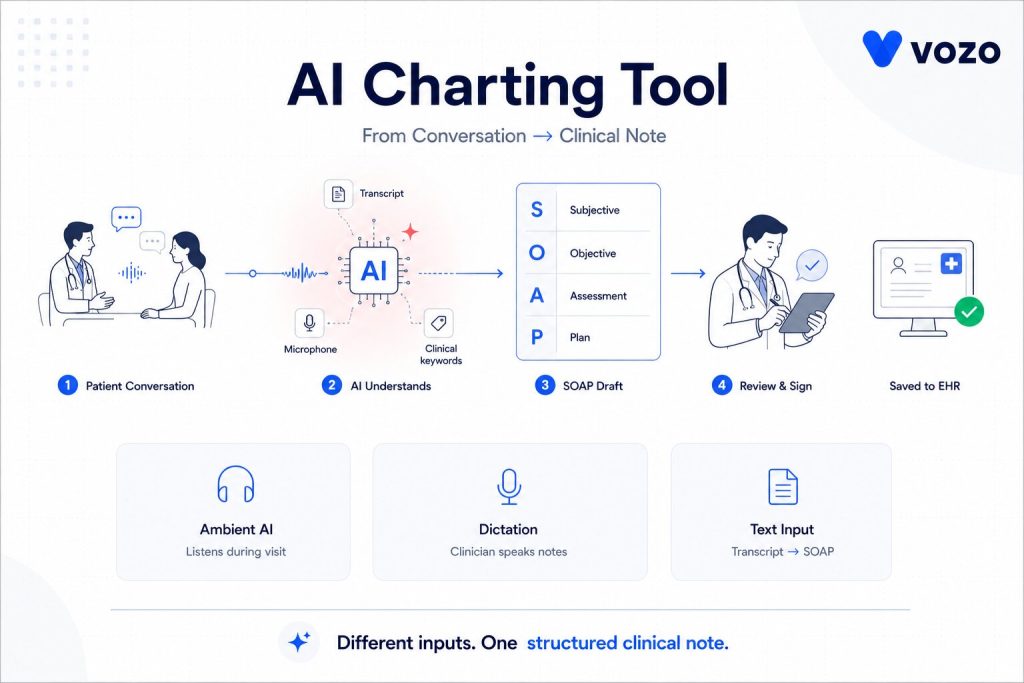
An AI charting tool is software that listens to a patient encounter, or reads a transcript of one, and automatically drafts clinical documentation, usually formatted as a SOAP note covering Subjective, Objective, Assessment, and Plan sections.
The clinician doesn’t have to type notes during or after the visit, but just talks with the patient as they would do otherwise. The tool captures that conversation and transcribes it, then identifies the clinically relevant information, sorts it into the appropriate SOAP portion, and returns a draft note for review.
The clinician reads through it, edits anything that needs correcting, and signs off before it becomes part of the record.
Most tools on the market fall into a few general categories:
- Ambient listening tools, often called AI medical scribe tools, that pick up the visit passively and generate a note once it ends
- Dictation-based tools where the clinician speaks the note aloud and the software organizes it into structure
- Text-based tools that take rough notes or a transcript you paste in and convert it into a formatted SOAP note
All three approaches solve the same underlying problem: they turn a free-flowing patient conversation into a structured, chart-ready note without requiring the clinician to type it line by line.
AI SOAP Note Documentation Workflow
| Step | What Happens |
| Capture | The tool records or processes the visit conversation. |
| Transcription | Speech is converted into text. |
| Clinical extraction | Symptoms, diagnoses, vitals, medications, and plans are identified. |
| SOAP structuring | Details are arranged into Subjective, Objective, Assessment, and Plan. |
| Provider review | The clinician edits and signs the final note. |
| EHR entry | The note is saved or pushed into the charting system. |
Why SOAP Note Documentation Is Such a Time Sink
Before getting into the “how,” it helps to understand just how large this problem has become.
SOAP notes exist for good reasons. They standardize documentation, support billing and coding, and create a defensible medical record. But writing one properly, for every patient, every single day, adds up to a real burden over weeks and months.
Here’s what recent data shows about the documentation load clinicians are carrying:
| Finding | What the Data Shows |
| Average physician workweek | About 58 hours total, with 27 hours in direct patient care and 13 hours on indirect tasks like documentation and referrals |
| Monthly documentation load | More than half of clinicians report losing 44+ hours a month to documentation alone, more than a full extra workweek |
| After-hours charting | Roughly one in five physicians spend more than eight hours a week working in the EHR outside normal hours |
| Top driver of burnout | Bureaucratic workload and EHR demands, cited by well over half of physicians reporting burnout symptoms |
This isn’t only a physician problem, either. Nurses, therapists, physical therapists, and behavioral health providers all carry a similar SOAP note burden, often with less support staff available to help offset it.
The result is a system where clinicians finish their last appointment of the day and then quietly start a second shift, typing up notes at home hours after the patient has already left. This is the exact gap AI charting tools were built to close.
How AI Charting Tools Actually Speed Up SOAP Notes
Here’s the part many articles skip over. This isn’t magic; it’s a fairly specific technical process, and understanding it helps you judge whether a given tool will genuinely fit your workflow.
1. Ambient Listening Captures the Visit as It Happens
Most modern tools rely on ambient listening, meaning a microphone or app that picks up the patient encounter in real time, whether it happens in person or over a telehealth call. There’s no pausing to dictate and no stopping mid-conversation to type. You simply talk with your patient the way you always have.
This alone removes the single biggest time cost in the old workflow, which is constantly switching between “treating the patient” mode and “documenting the patient” mode.
Large rollouts of this approach at major health systems have reported saving tens of thousands of physician hours in a single year by cutting down both in-visit documentation time and after-hours charting together.
2. Speech Recognition Converts the Conversation Into Text
When a conversation is recorded, the automatic speech recognition translates it into text. Whereas a general transcription tool might misdiagnose similar-sounding words (e.g. hypertension vs hypotension), medical-specific speech models are better at distinguishing them and identifying correct pronunciation of medical terminology, such as medication names.
3. Natural Language Processing Sorts Everything Into the Right SOAP Section
This is where most of the real time saving happens. A natural language processing model reads through the transcript and determines what belongs where:
- Subjective: the patient’s own words, including symptoms, pain level, history, and concerns
- Objective: measurable findings, such as vitals, exam results, and lab values
- Assessment: clinical reasoning and diagnosis
- Plan: treatment steps, medications, and follow-up instructions
Instead of mentally sorting through twenty minutes of conversation after the fact and typing each piece into the right box, the software handles that separation automatically.
This step also helps prevent the common “merged note” problem, where subjective complaints and objective findings blend because a clinician is reconstructing the visit from memory late in the evening.
4. The Draft Note Moves Into the EHR or Charting Workflow
Some AI charting tools push notes directly into the EHR through APIs or native integrations. Others create a draft that the provider must copy, import, or approve manually. The deeper the EHR integration, the more time the tool saves.
5. You Review, Edit, and Sign, Rather Than Write From Scratch
This step is the one people misunderstand most often. AI charting tools don’t remove the clinician from the process; they change the role from author to editor.
Instead of staring at a blank note and building it word by word, you’re reading a draft that’s already largely correct and adjusting the details that need it. That shift, from writing to reviewing, is where nearly all of the time savings actually come from.
| Manual Note | AI-Assisted Draft | Why It’s Better |
| The patient reports anxiety. Discussed coping skills. Continue therapy. | Patient reports increased anxiety this week with two panic episodes and avoidance of driving alone. The session focused on grounding skills and exposure planning. The patient agreed to complete one short driving exposure before the next visit. | Adds symptom detail, functional impact, intervention, response, and next step. |
Reduce SOAP Note Time Without Losing Clinical Control
Vozo helps providers simplify AI SOAP note documentation with structured clinical notes, specialty-ready workflows, and review-first charting. Keep providers focused on the patient while documentation becomes faster, cleaner, and easier to complete.
How AI Charting Tools Connect With EHR Systems
| Integration Type | What It Means |
| Native EHR integration | The note appears inside the provider’s existing charting workflow. |
| API-based integration | The tool sends structured or semi-structured documentation through supported EHR APIs. |
| FHIR-based exchange | Clinical documents, observations, encounters, or notes may be exchanged using FHIR resources where supported. |
| Copy-paste workflow | Fast to start, but weak for scale, auditability, and workflow efficiency. |
| Telehealth integration | The tool captures audio from virtual visits and drafts the note after or during the encounter. |
How Much Time Do AI Charting Tools Save?
Most AI charting tools save time by reducing first-draft writing, not by removing clinician review. In real-world studies, the strongest evidence is reduced cognitive load, less after-hours documentation, and lower burnout. Exact minutes saved vary by specialty, visit length, EHR integration, and how much editing the clinician still needs to do.
A few data points worth knowing:
- Vendor-reported savings may be high, but real-world results should be measured by note completion time, edit rate, after-hours EHR time, and provider satisfaction during a pilot.
- Health systems that have rolled these tools out broadly among providers within a year, along with tens of thousands of administrative hours saved.
- Separate research on AI-assisted documentation in rehabilitation settings found that notes generated with AI support, and reviewed by a clinician, reached quality levels comparable to notes written entirely by hand.
How well a tool is configured, how complex your visits usually are, and how attentively clinicians read multiple drafts before accepting them are a big part of the equation.
A 90-second saving for an EP on each note can be a 10-minute saving for a therapist doing 50-minute sessions every day. The visit length changes the payoff even when the underlying efficiency is similar.
Limitations of AI Charting Tools Providers Should Know
- AI drafts can miss clinical details if the conversation is unclear.
- The tool may place information in the wrong SOAP section.
- It can generate unsupported statements if the model is not well controlled.
- Background noise, accents, overlapping speech, and specialty terminology can affect accuracy.
- The clinician remains responsible for reviewing and signing the final note.
- Practices should never allow auto-signing without provider review.
What Good SOAP Note Quality Looks Like in an AI Draft
Speed only matters if the resulting note is still accurate and defensible. Here’s what tends to separate a well-built Clinical documentation AI platform from one that only sounds impressive during a demo.
| Quality Marker | Why It Matters |
| Strict section separation | Subjective stays in the patient’s own words; Objective holds only measurable findings. Blending the two recreates the merged note problem the tool is meant to solve |
| Traceability to the transcript | You can click a line in the note and see exactly where it came from in the conversation. This is how you catch an error before signing your name to it |
| Specialty awareness | Psychiatry notes and physical therapy notes don’t look the same. A good tool supports formats like DAP, BIRP, and GIRP, not just a generic SOAP template |
| Genuine editability | You should be able to correct a wrong detail in seconds, not fight a rigid template to fix one line |
Is AI Charting HIPAA Compliant?
The short answer is yes, it can be. But this only holds when the vendor sets things up correctly. This is exactly where many practices get tripped up.
A Signed Business Associate Agreement Is Not Optional
If an AI medical documentation vendor creates, receives, maintains, or transmits PHI on behalf of a covered entity, it is generally acting as a business associate and should be covered by a HIPAA-compliant Business Associate Agreement.
Check the Full Chain of Vendors, Not Just the One You Signed With
If a charting tool sends audio to a separate speech recognition service behind the scenes, that service needs its own signed agreement too. Ask directly whether patient audio ever touches outside services. Then confirm those services are properly covered.
Clarify Model Training Upfront
A solid agreement should clearly stop a vendor from using your patient data to train or improve its underlying models. This should apply unless your practice gives separate, specific authorization.
Handle Patient Consent as Its Own Issue
Patient consent sits apart from HIPAA itself. Many states regulate the recording of private talks. Some require consent from every party on the call. Before you roll out any listening-based tool, build a simple way to tell patients a visit is being recorded. Give them a clear option to opt out.
Confirm Encryption in Transit and at Rest
This is largely standard at this point. Still, confirm it directly rather than assuming it. Ask for a vendor’s actual security documentation instead of relying on language from a marketing page.
If a vendor can’t answer these questions clearly, or leans on vague reassurances instead of specifics, treat that as a warning sign, not a comfort.
What to Look For While Choosing an AI Charting Tool
Integration Depth
Does the tool push finished notes directly into your existing charting system? Or does someone still need to copy and paste between two separate windows? The deeper the integration, the more time the tool actually saves.
Specialty Fit
A tool built mainly for general primary care won’t automatically handle behavioral health formulations or physical therapy progress notes well. Check for templates that actually match your day-to-day workflow.
Edit Rate
Ask what percentage of AI-generated notes typically need significant edits before a clinician signs off. This number is a strong proxy for real-world accuracy. A tool with a high edit rate isn’t saving you as much time as it claims.
Compliance Posture
Run through everything covered in the HIPAA section above. A tool that can’t clear these basics isn’t worth the time savings it promises.
Pricing Transparency
Per-provider monthly pricing is common. But some plans quietly gate integrations or specialty templates behind higher tiers. Ask for the full EHR pricing breakdown before you commit.
Mobile and Desktop Consistency
This matters most if your day involves moving between exam rooms and a desktop workstation. The tool should work the same way in both places.
The most reliable way to test all of this is a short pilot. Run it with two or three providers before rolling a tool out practice-wide. Track minutes saved per note, time spent editing, and any change in after-hours charting before and after. That real data will tell you far more than any product demo.
Frequently Asked Questions
1. How do you create an AI SOAP note?
To create an AI SOAP note, start the AI charting tool before or during the visit. It captures the conversation or transcript, identifies clinical details, and organizes them into Subjective, Objective, Assessment, and Plan sections. The provider then reviews the draft, corrects errors, and signs it before it becomes part of the chart.
2. Does AI charting replace the provider’s clinical judgment?
No. AI charting tools do not replace the provider’s clinical judgment. They create a draft SOAP note from the visit conversation, but the clinician must review, edit, and sign the final note before it becomes part of the medical record. The provider remains responsible for clinical accuracy, diagnosis, treatment decisions, and documentation quality.
3. What should practices check before using AI medical documentation tools?
Practices should check EHR integration, HIPAA readiness, Business Associate Agreement availability, transcript traceability, edit controls, audio retention policy, and specialty-specific templates. They should also test the tool with a small provider pilot to measure note accuracy, edit rate, minutes saved per note, and after-hours documentation reduction.
4. Can AI charting tools handle formats other than SOAP?
Yes. Many AI charting tools support documentation formats beyond SOAP, including DAP, BIRP, GIRP, progress notes, and history and physical notes. This is useful for behavioral health, therapy, nursing, and specialty practices where the best note structure depends on the clinical workflow, payer expectations, and care setting.
5. How accurate are AI-generated SOAP notes?
Accuracy varies by tool and by how complex a visit is. Well-built tools with traceable transcripts and specialty-specific templates tend to need only minor edits. The safest habit is still reading every draft carefully before signing, the same way you’d review a note written by a scribe or a resident.
6. Do AI charting tools work for telehealth visits?
Yes. AI charting tools work well for telehealth because the encounter audio is already digital. The tool can capture the virtual conversation, identify clinically relevant details, and draft a SOAP note during or after the session. Providers should still confirm patient consent, privacy settings, and note accuracy before signing.
About the author
Lara Dixit


Lara Dixit is a Senior Business Manager at Vozo Health, specializing in EHR platforms, practice management, billing, and revenue cycle optimization. She helps healthcare providers improve operational efficiency, streamline workflows, and drive sustainable practice growth. At Vozo Health, she focuses on business strategy, healthcare automation, and scalable growth for modern medical practices.