
Vozohealth

Stop Chasing Referrals.

Referral Management That Helps Patients Move Forward

Delays between referral and completion frustrate patients and providers. Vozo keeps referrals progressing without constant staff outreach.

Why Choose Vozo for Referral Management

Built for care teams who need referrals to move forward, not disappear into inboxes and spreadsheets.

EHR-connected Flow

Referral management EHR integration keeps referral activity tied directly to patient records without manual tracking.

End-to-end Visibility

Electronic referral management provides clear status updates from referral creation through completion.

Less Staff Chasing

Automated referral workflow reduces follow-up calls and manual outreach to patients and receiving providers.
Features

What Referral Management Handles for You

Keeps referrals organized, visible, and moving forward.

Referral Creation

Capture referral details directly from patient charts to reduce errors and incomplete submissions during care.
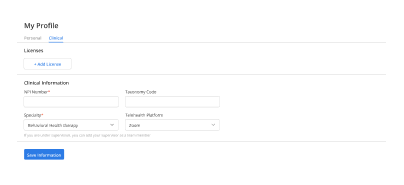
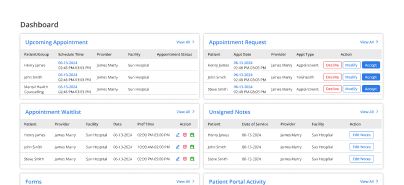
Automated Routing

Automated referral workflow sends referrals to appropriate providers without staff manually coordinating handoffs.
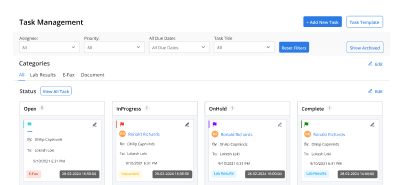
Status Tracking

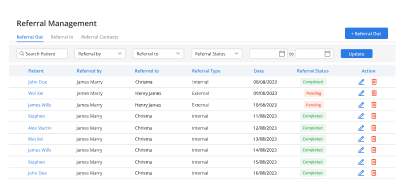
Referral tracking software shows pending, scheduled, and completed referrals in one centralized view.
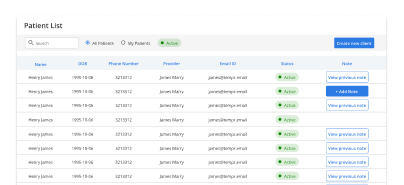
Patient Follow-Up

Prompt patients to complete next referral steps without repeated outreach or phone calls from staff.

EHR Integration

Keep all referral activity documented within the patient record for continuity and accountability across visits.

Completion Visibility

Confirm referral outcomes clearly so care teams know when follow-up is complete across workflows system.

How Referral Management Fits Into Your Day

Referral tracking

Status visibility

Outreach reduction

Care follow-through

Chart accuracy

Coordination predictability

Transition experience
Operational Impact You Can Measure

Clear improvements in referral completion and staff efficiency.

Fewer Drop Offs
0 %
Faster Follow Up
0 %
Less Rework
0 %
Lost Referrals
0

Additional Related Features

Automated Reminders

Task completion ➜

Patient Portal

Patient follow through ➜

CCDA

Care transitions ➜

Dedicated Dashboard

Referral oversight ➜

Testimonials

Success Stories From Our Users

What Practices Say

“Referrals used to disappear into calls, inboxes, and follow-up lists. Vozo helped our team keep referral status, patient updates, and completion steps visible from one workflow.”

— Dr. Oren Blackwell, Care Coordination Physician

“Our staff spent too much time chasing referral updates manually. Vozo made it easier to route referrals, track pending steps, and follow up with patients before delays became bigger issues.”

— Fiona Merrick, Referral Operations Manager

Blogs & Resources

Resources to Help Your Practice Grow

Vozo Referral Platform

EHR-connected referral management eliminates manual chasing with automated tracking and status updates for seamless patient transitions.

E-Prescribing E-Referrals

How integrated e-prescribing and electronic referrals revolutionize healthcare workflows by replacing faxes with secure digital specialist coordination.

Outpatient EHR Selection

Comprehensive guide for selecting optimal EHR systems for outpatient clinics, focusing on referral capabilities and workflow integration needs.

FAQ

What Care Teams Ask About Referral Management

Why do patient referrals often get delayed?

Patient referrals often get delayed because clinics still depend on fax, phone calls, paper forms, and manual coordination between providers. Missing documents, unclear referral status, and slow communication create bottlenecks. A connected Patient Referral System helps organize referrals and reduce delays across the care process.

Which details should be included in a referral request?

A referral request should include patient demographics, insurance details, diagnosis information, medications, clinical notes, imaging, lab results, and the reason for referral. Complete referral information helps specialists review cases faster, reduce clarification requests, and schedule patients without unnecessary administrative follow-up between offices.

How can clinics avoid losing track of referrals?

Clinics can avoid lost referrals by tracking referral status from creation through specialist completion. Referral Tracking Software gives staff visibility into pending, scheduled, completed, and unanswered referrals. This reduces dependency on spreadsheets, sticky notes, or manual reminder lists that often create follow-up gaps.

When should referral updates be documented in the EHR?

Referral updates should be documented when the referral is submitted, accepted, scheduled, completed, or returned with specialist recommendations. Keeping status updates inside the patient chart helps providers follow the patient journey more accurately and improves continuity between primary care, specialty care, and follow-up visits.

How does electronic referral management improve provider communication?

Electronic Referral Management improves provider communication by securely sharing referral details, clinical documents, and specialist responses through one workflow. This reduces fax delays, repeated calls, and missing paperwork while helping referring providers and specialists stay aligned on patient care and follow-up responsibilities.

Can automated referral workflows reduce administrative workload?

Yes. An Automated Referral Workflow can notify staff about missing records, pending approvals, specialist responses, and overdue follow-ups automatically. This reduces repetitive tracking work and helps clinics manage large referral volumes more efficiently without adding extra administrative burden to front-desk or care coordination teams.

How should referral workflows connect with patient records?

Referral Management EHR Integration should connect referrals directly with clinical notes, diagnoses, insurance details, appointments, and specialist updates. Keeping everything linked inside the patient chart improves documentation continuity and helps providers review referral history without switching between disconnected systems or duplicate records.

How does Vozo manage referrals within daily clinical workflows?

Vozo helps practices create, send, track, and review referrals directly inside the EHR workflow. Referral requests, supporting documents, patient records, and specialist updates remain connected within one chart, helping teams reduce manual coordination and improve visibility across the entire referral process.

What does Vozo referral management cost for practices?

Vozo pricing starts at $25 per provider per month for EHR access, including scheduling, referral workflows, documentation, billing, and patient communication tools. Practices can review referral management capabilities through a guided demo to understand how Vozo supports specialty coordination and follow-up tracking workflows.

Can Vozo help practices close referral follow-up gaps?

Yes. Vozo helps practices monitor referral completion, pending specialist responses, and unresolved patient follow-ups from one connected workflow. This gives care teams better visibility into referral progress and helps reduce missed appointments, incomplete referrals, and communication gaps between referring and receiving providers.

Every Missed Slot Costs More

Stabilize your schedule now before small gaps turn into daily disruptions.

✓ No Credit Card Required


  • 24/7 Support
  • Free data migration from your old EHR


  • Built-in telehealth
  • Automated appointment reminders


  • Increase revenue by 30%
  • Complete patient notes
Launch login modal Launch register modal