Vozohealth

Care That Moves With You.

Mobile EHR Software for Practices

Moving between rooms slows charting and schedules. Mobile workflows keep records current throughout the day.

Trusted by Medical Providers across the USA.

Why Providers Choose VOZO Mobile EHR Software

VOZO supports mobile care delivery by keeping schedules, charts, and communication connected across devices throughout the day.

Care Stays Connected

Schedules, charts, notes, and billing stay linked across devices without syncing delays or repeated logins.

Access Anywhere

A cloud-based mobile EHR keeps records available wherever care happens, across clinics, homes, and remote settings.

Security Included

Secure mobile EHR access protects patient data on phones and tablets without added steps.

Features

Mobile EHR Software Built for Daily Care

Mobile EHR software designed to keep documentation current without forcing providers back to desks.

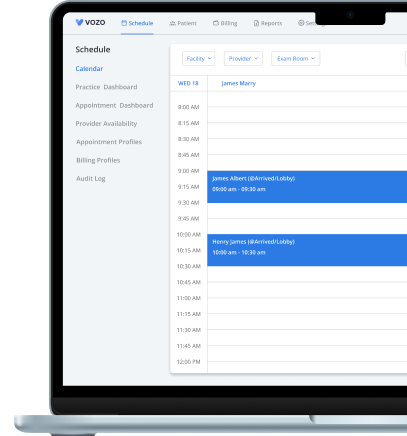
Mobile Scheduling

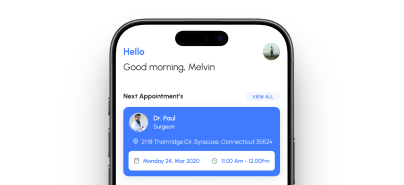
Manage appointments using mobile EHR software that syncs instantly across devices without conflicts or manual updates.

Mobile Documentation

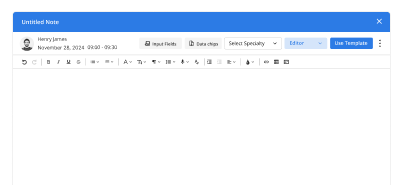
Complete notes securely through an EHR mobile app, keeping records current during rounds or remote care.

Automated Reminders

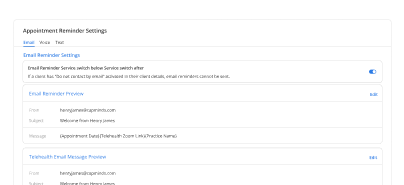
Reduce no-shows with automated reminders sent through a responsive EHR platform supporting mobile workflows.

Cloud-Based Access

Access patient charts anywhere using a cloud-based mobile EHR synced securely across phones and tablets.
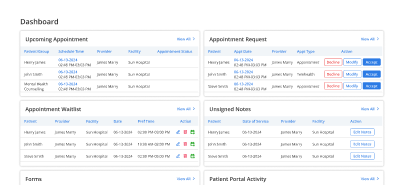
Dedicated Mobile Dashboard

View schedules, tasks, and messages from a mobile dashboard designed for fast decisions during busy shifts.

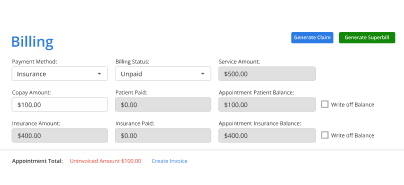
Mobile Billing Access

Review charges and visit details using mobile EMR software without returning to desktops between appointments.

Outcomes Practices Feel Every Week

Mobile-first workflows minimize delays and ensure documentation remains current throughout the day.

Faster Updates
0 %
Fewer Delays
0 %
Shorter Follow-Ups
0 %
Secure Access
0 %

Built for Mobile-First Care Teams

How it works

Step Onboarding

Switch to Vozo EHR and get a smooth, all-in-one experience built for behavioral health.

Switch to Vozo EHR and get a smooth, all-in-one experience built for behavioral health.

1
Create Your Account

Start a free trial or schedule a guided demo.

2
Set Up Your Practice

We migrate your data securely and configure mobile workflows.

3
Work From Anywhere

Access your EHR on mobile devices without disruption.

Testimonials

Success Stories From Our Users

What Providers Say

“Vozo made patient updates easier to manage when I’m moving between rooms. I can review schedules, check notes, and stay connected without being tied to the front desk system.”

— Dr. Hannah Miller, Internal Medicine Physician

“Our providers needed faster access during busy clinic hours. Vozo’s mobile EHR made it easier to keep up with patient details, appointments, and follow-ups from anywhere in the practice.”

— Jason Reed, Practice Manager

Blogs & Resources

Resources to Help Your Practice Grow

EHR Features for Small Practices

Essential 2026 EHR tools, including mobile access,s streamline workflows for budget-conscious small practices.

Top Outpatient EHRs

Vozo leads as a cost-effective EHR solution for outpatient clinics with integrated workflows and telehealth capabilities.

Best Tebra Alternatives

Vozo offers affordable EHR alternatives to Tebra with better support and transparent pricing for small practices.

FAQ

What Mobile EHR Users Ask Us Most

What is mobile EHR software?

Mobile EHR software is a cloud‑based electronic health record system that providers can access on smartphones and tablets. It allows clinicians to view patient charts, enter notes, manage orders, and communicate with staff from anywhere.

This on‑the‑go access improves clinical workflow, supports remote documentation, and enhances patient engagement while ensuring secure, HIPAA‑compliant data handling across devices.

How does mobile EHR differ from traditional EHR?

A mobile EHR offers the same clinical and administrative functionality as traditional desktop EHRs but optimized for tablets and phones. Unlike legacy systems tied to a clinic workstation, mobile EHRs let providers access patient data, record notes, and manage care remotely.

The mobility enables faster decision‑making, better point‑of‑care documentation, and improved efficiency for providers on the go.

Why are clinics adopting mobile EHR software?

Clinics adopt mobile EHR software to increase provider productivity, reduce time spent at workstations, and improve patient interactions. The ability to document care in real time, review labs, manage appointments, and communicate securely from mobile devices minimizes delays.

It supports efficient clinical workflows, especially for providers who split time between exam rooms, remote visits, and procedural areas.

Is mobile EHR secure for patient data?

Yes, mobile EHR systems are designed with encryption, access controls, and compliance protocols like HIPAA to protect patient data on smartphones, tablets, and laptops. Secure login, automatic session timeouts, and encrypted data transmission ensure records remain protected.

Reputable mobile EHR vendors also regularly update security protocols to safeguard data across devices and networks.

Can mobile EHR integrate with other healthcare systems?

Yes, quality mobile EHR software integrates with practice management, billing, lab systems, patient portals, and telehealth platforms. These integrations ensure that clinical and administrative data flows seamlessly between systems, reducing duplicate entry and errors.

With APIs and interoperability standards like HL7/FHIR, mobile EHRs enable coordinated care, real‑time updates, and comprehensive patient records across platforms.

How does mobile EHR support telehealth services?

Mobile EHR supports telehealth by allowing providers to launch secure video visits, document care, and access patient histories from the same interface. During a virtual visit, clinicians can update charts, prescribe medications, view labs, and complete clinical tasks without switching systems.

This consolidated workflow improves provider efficiency and ensures consistent documentation across in‑person and virtual care.

How does Vozo EHR’s mobile software improve clinical workflows?

Vozo EHR’s mobile software streamlines clinical workflows by enabling providers to access charts, enter notes, manage orders, and communicate securely from tablets and phones.

Built-in tools like voice‑dictation, customizable templates, and real‑time patient information reduce documentation time. With seamless integration across devices and desktop systems, Vozo helps clinics improve efficiency, responsiveness, and overall care delivery.

Why should clinics choose Vozo EHR mobile software over other options?

Clinics should choose Vozo EHR mobile software because of its intuitive interface, deep integration with practice management and billing, and robust security features.

Vozo’s mobile platform is optimized for real‑world clinical use with offline access, fast navigation, and customizable workflows. Dedicated support, regular updates, and comprehensive training help practices maximize mobile EHR value and adoption.

How can clinics start using Vozo EHR’s mobile software?

Clinics can start using Vozo EHR’s mobile software by scheduling a demo or signing up for a trial through the Vozo website. The onboarding team assists with setup, configuration, and training to ensure a smooth transition.

With full technical support and resources, clinics can quickly leverage mobile EHR capabilities to improve productivity and patient care.

How much time can providers save using mobile EHR?

Providers can save meaningful time using mobile EHR by updating charts, reviewing records, checking schedules, and handling follow-ups without returning to a desktop between visits.

Mobile access reduces workflow interruptions, shortens documentation delays, and keeps patient information updated throughout the day. This helps providers move faster between rooms or locations while spending less time on repetitive administrative tasks.

Care Doesn’t Stay at a Desk

Mobile care days fill fast. Set up your workflow before your next shift begins.

✓ No Credit Card Required

Launch login modal Launch register modal