
Vozohealth

Growth Needs Precision.

AI Medical Charting Software for Efficient Clinical Workflows

When growth data or clinical notes are delayed, accuracy suffers. Vozo brings speed, consistency, and clarity to AI medical charting and growth tracking.

Why Charting Belongs Inside Your Workflow

Designed for practices tracking growth alongside everyday clinical documentation.

Designed for Real Visits

Supports fast-paced pediatric and family care without interrupting patient interaction.

AI powered Documentation

AI clinical charting software reduces manual typing while preserving clinical accuracy.

Growth aware Charting

Growth chart tracking tool keeps measurements structured and comparable over time.
Features

From Measurements to Complete Charts

Keeps growth data and clinical notes accurate, visible, and ready for care decisions.

Automated Charting

AI medical charting captures visit details quickly without after-hours documentation.

AI Medical Scribe Support

Reduce manual note-taking while maintaining clear, compliant clinical records.
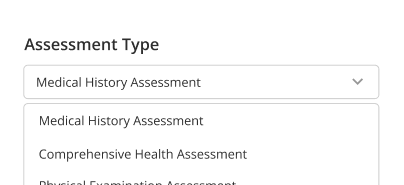
Growth Chart Tracking

Automated growth charting visualizes height, weight, and development trends.
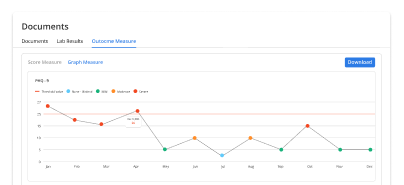
Trend Visibility

See changes over time clearly to support early intervention and care planning.
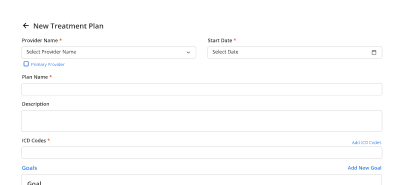
Clinical Alignment

Charts stay connected to vitals, notes, and treatment plans.
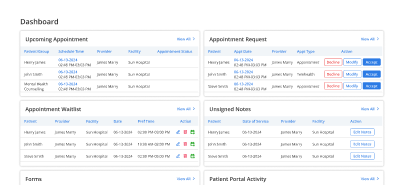
Care Team Clarity

Everyone sees the same structured data without duplicate entry.

What Gets Easier Each Day

Efficient charting

Rapid growth charts

Backlog reduction

Decision support

Provider handoffs

Development visualization

Patient focus
The Difference Faster Charting Makes

Spend less time charting and more time delivering care.

Structured Growth Data
0 %
Faster Charting
0 %
Less Manual Entry
0 %
Same Day Charts
0 %

Connected Clinical Tools

Vital Signs Monitoring

Accurate inputs ➜

Notes & Documentation

Linked records ➜

Flowsheets

Visual trends ➜

Care Coordination

Shared visibilityg ➜

Testimonials

Success Stories From Our Users

From Practices Like Yours

“Vozo helped me finish charting closer to the visit instead of catching up after clinic hours. The AI documentation support keeps notes structured while still giving me full control to review and edit.”

— Dr. Brielle Lawson, Family Medicine Physician

“Our pediatric team needed faster charting without losing growth data accuracy. Vozo made it easier to document visits, track development trends, and keep measurements connected to the patient record.”

— Kendra Ashwell, Pediatric Practice Manager

Blogs & Resources

Resources to Help Your Practice Grow

HealthScribe AI Charting

HealthScribe AI transforms medical charting using real-time provider-patient conversations and NLP automation.

AI-EHR Integration Reasons

Five key reasons to integrate AI charting tools directly into your EHR for workflow efficiency.

AI Documentation Automation

AI-powered tools automate EHR charting and note-taking to reduce provider administrative burden.

FAQ

What care teams ask us most about Growth Charting

Why do providers lose time on clinical documentation daily?

Providers lose time when every visit note must be typed, corrected, and completed after patient hours. Manual documentation creates longer workdays, delayed chart closure, and more administrative pressure.

AI Charting Software helps reduce this burden by turning patient-provider conversations into structured draft notes that clinicians can review instead of writing everything from scratch.

How does AI charting support patient encounter notes?
AI charting listens during the patient visit, identifies relevant clinical details, and organizes them into a structured note format. Instead of copying conversation details manually, providers receive a draft note for review. This helps save time, improve consistency, and keep documentation aligned with the actual care delivered during the encounter.
How is an ambient AI scribe different from dictation?

Dictation mainly converts spoken words into text. An AI Medical Scribe understands clinical context, separates speakers, captures symptoms, plans, and assessment details, then structures them into usable documentation.

It works in the background during the visit, so providers do not need to pause the conversation or dictate in a rigid format.

Can clinicians edit AI-generated notes before saving them?

Yes. AI-generated notes should always remain editable before they become part of the patient record. The provider reviews, corrects, and approves the final note.

AI Clinical Charting Software reduces typing work, but clinical responsibility stays with the clinician to confirm accuracy, compliance, and relevance before saving.

How can AI medical charting reduce documentation mistakes?

AI Medical Charting helps reduce errors by capturing visit details directly from the conversation and organizing them into consistent note sections. It can reduce missed fields, unclear wording, and rushed after-hours entries.

Providers still review the draft, but the documentation process becomes less dependent on memory and manual typing under time pressure.

Does AI charting adapt to different medical specialties?

Yes. Strong AI charting tools support specialty-specific documentation needs instead of using one generic note format. Primary care, behavioral health, orthopedics, pediatrics, and other specialties may need different templates.

For pediatric workflows, a Growth Chart Tracking Tool and Automated Growth Charting can help connect growth data with visit documentation.

Is AI charting secure for patient health information?

AI charting should follow HIPAA-aligned security practices, including encryption, controlled access, and user authentication. Patient conversations and clinical notes must be handled within a secure environment.

A compliant AI Charting Software setup helps protect sensitive health information while allowing providers to create documentation faster and with better workflow control.

How does Vozo AI charting fit clinical documentation?

Vozo AI charting works inside the EHR encounter workflow, so providers do not need a separate platform. It captures the visit conversation, generates a draft clinical note, and supports review before saving.

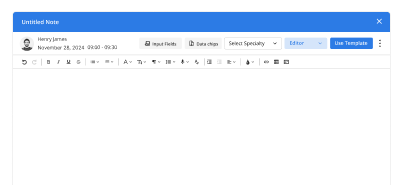
Vozo uses generative AI, macros, and data chips to match the provider’s documentation style and specialty needs.

Does Vozo EHR connect AI notes with billing?

Yes. Vozo EHR connects AI-assisted documentation with billing workflows. Diagnoses, procedures, and visit details captured in the note can support claim preparation without duplicate manual entry.

This helps reduce coding gaps, improve documentation continuity, and move providers from note review to billing more efficiently within the same system.

How can practices start using Vozo AI charting?

Practices can start with Vozo AI charting through a 14-day free trial with no credit card required. The trial includes live transcription, generative note creation, and clinical documentation tools. Teams that want a closer workflow review can also book a guided demo to see how Vozo fits into daily encounters.

Every Missed Slot Costs More

Stabilize your schedule now before small gaps turn into daily disruptions.

✓ No Credit Card Required


  • 24/7 Support
  • Free data migration from your old EHR


  • Built-in telehealth
  • Automated appointment reminders


  • Increase revenue by 30%
  • Complete patient notes
Launch login modal Launch register modal