

Evaluating Patient Portal Software: A Guide for Healthcare Providers
The Patient portal is a vital tool for engagement, communication, and operational efficiency in the digital age of healthcare. Patients demand easy access to their health information, doctors rely on it to improve care, and managers rely on it to cut costs.
However, not all portals are made equal. Some struggle with outdated features or complex interfaces, but others improve the patient experience and clinical workflows.
Steps to Evaluate Patient Portal Software
1. User Experience
If your gateway is slow, confusing, or seems like it was developed in 2008, it is harming your practice. Patients will not use something that makes them frustrated.
Key Evaluation Points
- Ease of Navigation – Can users find test results, appointments, and communications with only 2-3 clicks?
- Mobile Optimization – Is the portal responsive and usable on smartphones and tablets?
- Language and Accessibility Support – Does it meet ADA standards? Is it multilingual?
- Login and Security – Are there simple and secure login options such as MFA, biometrics, and SSO with other systems?
2. Core Features
Every patient portal should provide a common set of features. If your software lacks any of the following, you are not providing your patients with what they expect.
- Schedule appointments and receive reminders.
- Secure two-way texting with providers.
- Access the lab/test results.
- Prescription refill requests
- Billing and Online Payment
- Download your health history and records (CCD, PDF).
Integration with wearables or remote monitoring devices is very useful for chronic disease management. If your staff is still spending time transmitting fundamental information that patients may get online, your portal is not working properly.
3. Interoperability
A brilliant portal does not work in a vacuum. It should communicate with your EHR, billing system, scheduling software, and, ideally, other providers’ systems.
- Direct integration with your EHR
- FHIR and HL7 Compliance
- APIs enable third-party tools or apps to connect.
- Data sharing with Health Information Exchanges.
When systems do not communicate, patients notice. Lab results are delayed. Appointments are miscommunicated. Care gets fragmented. True interoperability enables better outcomes and experiences.
4. Security and Compliance
Patient trust is based on security. If your gateway has weak encryption, inadequate audit trails, or out-of-date policies, you risk a HIPAA violation and your reputation.
Must-have Security Features
- End-to-end encryption both during transit and at rest
- Role-based access controls.
- Complete audit logs
- Multi-factor authentication choices
- Automatic logout and session timeout features
Compliance Checkpoints
- HIPAA
- HITECH
- ONC accreditation (if included in an EHR platform).
Ask your vendor for a current penetration test report or SOC 2 compliance paperwork. If they cannot supply it, you should reconsider your relationship.
5. Patient Engagement Tools
A portal that exists but is not being used is ineffective. You want patients to log in, ask questions, renew prescriptions, and pay bills. This necessitates built-in tools that motivate activity.
- Push notifications, SMS alerts
- Health education content based on diagnoses or medications
- Preventive care reminders for vaccines and screenings
- Satisfaction surveys or feedback gathering
- Tracking goals such as weight loss, blood pressure, and glucose levels
Review your usage data. If fewer than 30-40% of your active patients use the portal regularly, it’s time to reevaluate.
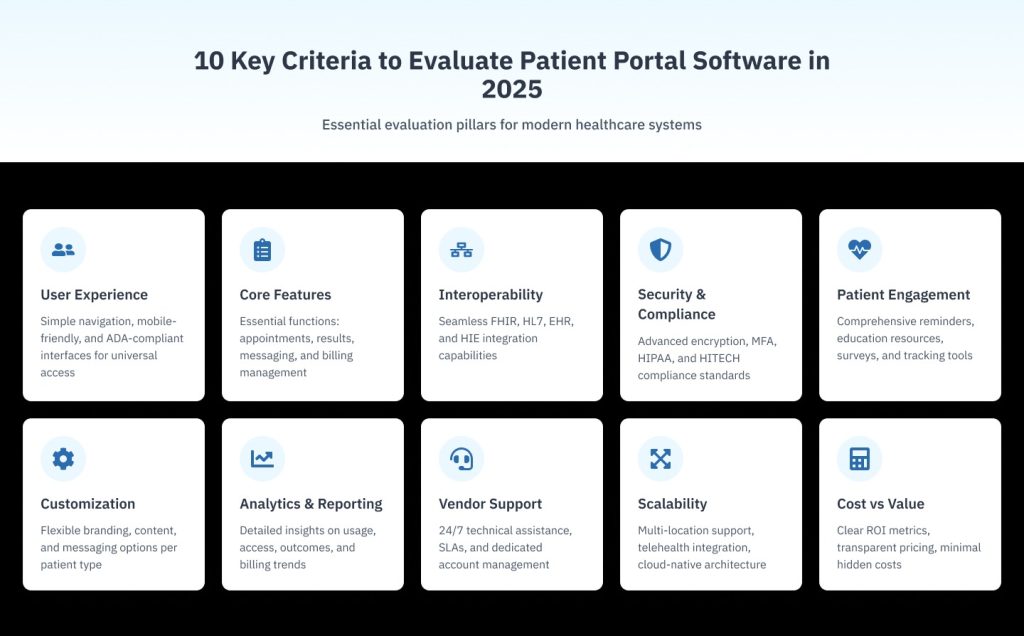
6. Customization
Patients should feel as if they’re communicating with your practice rather than some faceless tech corporation. Your portal should reflect your brand, both visually and functionally.
Customization choices to consider
- Colors, Logo, and Typography
- Custom fields and forms
- Message tone and templates
- You can add your content, such as FAQs, manuals, and contact information
The ability to segment material based on patient category, such as children vs. elderly patients, and automate appropriate messages.
7. Analytics and Reporting
You cannot manage what you do not measure. Strong portal platforms provide robust data, allowing you to optimize both operations and patient experiences.
Useful metrics include
- Patient activation and login rates
- Most-used vs underutilized features
- Response times for messages
- Time to access lab findings.
- Billing and payment habit trends
Using the appropriate data, you can improve your workflows, personnel allocation, and outreach initiatives, resulting in increased engagement and satisfaction.
7. Support and Vendor Responsiveness
Even the best software occasionally fails or needs maintenance. What distinguishes successful sellers from the rest is how they handle unexpected challenges.
- 24/7 support availability
- Dedicated account managers or effective teams
- Response Time SLAs
- Consistent software updates and feature rollouts
Ask for references or read internet reviews. If other practices complain about delayed issue fixes or poor communication, take them seriously.
9. Scalability and Future-proofing
Your portal must keep up with your expansion, whether it involves more patients, more locations, or new services such as telemedicine.
- Support across several locations and providers.
- Load management at peak hours
- Cloud-based Architecture
- AI functions include chatbots, appointment triage, and symptom checkers.
- Planned changes linked with healthcare trends.
Do not only buy for today. Think 3-5 years ahead and select software that will remain competitive and relevant.
10. Cost vs Value
Finally, there are the dollars. Don’t only look at the upfront expense. Consider the portal’s overall value in terms of reduced staff time, more patient retention, faster payments, and better outcomes.
- The total cost of ownership includes setup, training, support, and integrations.
- ROI of greater patient self-service
- Vendor pricing transparency and flexibility
- Contracts and Exit Clauses
Warning signs include hidden payments for “extra” modules, per-message charges, and nickel-and-diming with each upgrade. That is not a collaboration; it is exploitation.
Related: The Ultimate Patient Portal Checklist: What Every Healthcare Practice Needs
Vozo Patient Portal Solution
Vozo patient portal software provides a comprehensive solution to help healthcare providers achieve clinical, financial, and operational excellence through a powerful patient portal.
Our exceptional Patient Portal Software will allow:
- Have complete access to patients’ medical records digitally
- Our cost-effective subscription plan helps healthcare practices at all levels.
- The Vozo patient portal can effortlessly be integrated and implemented with any EHR system to increase productivity.
- Vozo’s Patient Portal respects users’ privacy and safeguards health-related records and personal information.
- 24/7 availability to support you with your needs and requirements.
- By understanding your unique needs for your specialty healthcare practice, we will customize Vozo’s patient portal for a seamless workflow.
Patients can request appointments, access health records and lab results, and even pay bills online with the help of a patient portal, which creates a personal touch with you always.
Leverage the Vozo Patient Portal for Better Healthcare Solutions.
About the author
Lara Dixit


Lara Dixit is a Senior Business Manager at Vozo Health, specializing in EHR platforms, practice management, billing, and revenue cycle optimization. She helps healthcare providers improve operational efficiency, streamline workflows, and drive sustainable practice growth. At Vozo Health, she focuses on business strategy, healthcare automation, and scalable growth for modern medical practices.